APE
Analyze. Plan. Execute.
Currently available for GitHub Copilot. More targets coming soon.
v0.0.14irm https://www.ccisne.dev/finite_ape_machine/install.ps1 | iex
Installs to %LOCALAPPDATA%\ape\, adds to PATH, and deploys APE agents to your AI coding tool.
curl -fsSL https://www.ccisne.dev/finite_ape_machine/install.sh | bash
Installs to ~/.ape/ and deploys APE agents to your AI coding tool.
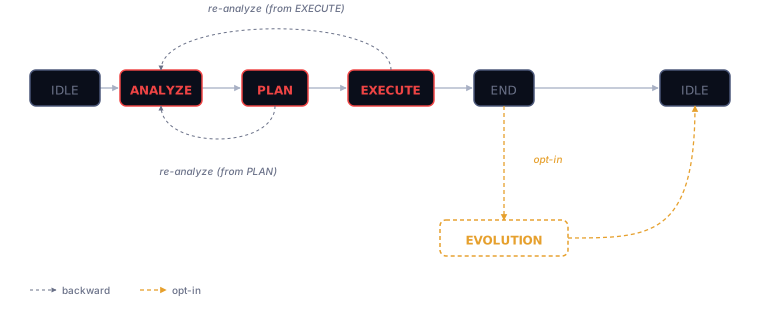
APE structures your AI coding assistant as a five-state finite machine — one specialized agent per phase, transitions verified by the CLI. The bet is methodology over model: if the framework carries the weight, a smaller or free model following it should stay useful where freestyling falls apart. That's the thesis APE exists to test.
The phases
ANALYZE
Clarify the problem. Capture requirements, assumptions, and edge cases before any code is written.
diagnosis.mdPLAN
Decompose the work. Order the steps, verify each, enumerate nothing missed.
plan.mdEXECUTE
Implement under the constraints of the tests. Each change small enough to merge confidently.
code + commitsBackward transitions from PLAN or EXECUTE back to ANALYZE are allowed — re-analysis is part of the contract.
Quick start
# verify prerequisites (ape, git, gh, gh auth)
ape doctor

# deploy APE agent + skills to your AI tool (Copilot today)
ape target get

# scaffold .ape/ in your repo
cd your-repo && ape init
Commands
apePrint ASCII banner + versionape initScaffold.ape/(state, config, mutations)ape doctorVerify prerequisitesape target getDeploy agent + skills to AI toolape state transitionExecute a deterministic FSM transitionape upgradeUpdate to the latest release
9 commands total — see the full table on GitHub.
Targets
APE deploys agent prompts and skills to the global configuration of your AI coding tool.
- GitHub Copilot
- Claude Code
- Codex
- Crush
- Gemini
Adapters for Claude, Codex, Crush, and Gemini already exist — awaiting a stable agent prompt API before being wired in (ADR D20).
Go deeper
Meet the APEs →
Four active agents — SOCRATES, DESCARTES, BASHŌ, DARWIN — and the honest story of five that collapsed.
Methodology →
The FSM, the transition contract, memory-as-code, and the semantic risk matrix.
APE builds APE →
The empirical bootstrap: APE is being built using APE. Each cycle is evidence.